


How To Check Open Orders?
Laurette Engnath LaRG
Updated at: 9 months ago
How To Check Open Orders?
Spot Trading a one of the most popular trading avenue in cryptocurrency trading. In Spot Trading users have the option to trade their cryptocurrency on the market price, and right then and there on the market. This means that you trade your cryptocurrency without any leverage or any interest rate, the trade is made on the market at the currency market rate. BNQ Global offers 3 types of Spot Trading for users to enjoy. All these trading types have their own benefits, and users can adjust their trade according to their own choice. These 3 types of trading orders are:
-
Limit Orders
-
Marker Orders
-
Trigger Orders
Once a user opens any of these trades, their history is saved on the exchange. Users have the option to check their order history, and their open orders on the exchange. If you want to check Open Spot Orders, then follow these steps:
-
Login to your BNQ Global account.
-
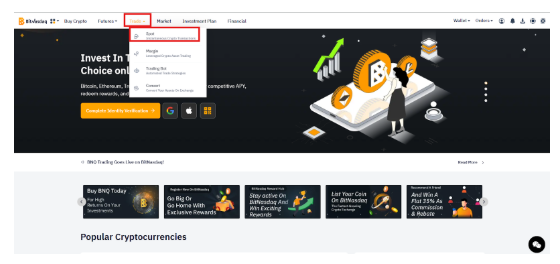
Once logged in, scroll to the Trade option available in the header.
-
Here click on the Spot option.
-
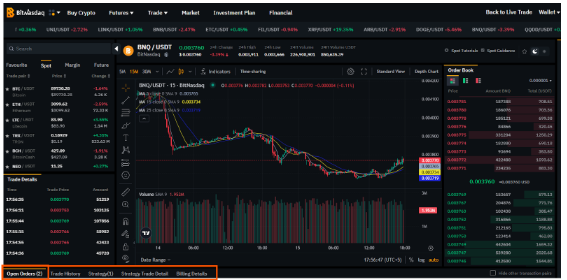
Once in the Spot Trading interface, scroll to the bottom of the candlestick chart.
-
Here there are multiple options available.
-
Out of these options select the Open Orders.
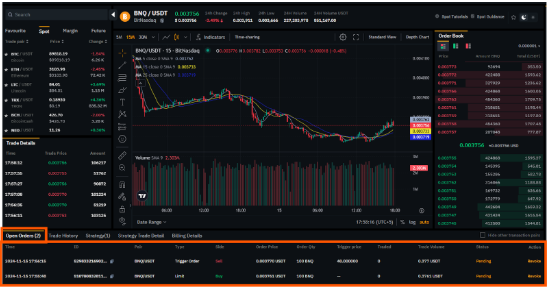
Once in the Open Orders tab, users can scroll through their entire open orders of Spot Trade, for all 3 types of the Spot Trading, including Market Orders, Limit Orders, and Trigger Orders.
This organizes Spot Trading for all the users, making BNQ Global a user-friendly platform for all trading with all the features needed for smooth operations. Head out to BNQ Global now, and to Spot Trading.