
Your browser does not support the audio element.
bitnasdaq-logo
  • ···
  • Buy Crypto
  • ···
  • Futures
  • ···
  • Trade
  • ···
  • Market
  • ···
  • Mining
  • ···
  • Financial
  • ···
  • Spot & Margin
    • Spot
    • Margin
    • FAQs
  • Future
    • FAQs
    • User Guide
  • Financial
    • FAQs
    • User Guide
  • P2P
    • FAQs
    • User Guide
  • Convert
    • FAQs
    • User Guide
  • Security
    • FAQs
    • User Guide
  • Affiliate Program
    • FAQs
    • User Guide
  • General
    • User Guide
  • Reward Hub
    • User Guide
    • FAQs
  • Strategy Bot
    • FAQs
  • Referal Program
    • FAQs
  • VIP & My Fee
    • FAQs
  • BNQ Token
    • FAQs
    • User Guide
  • Copy Trade
  • BNQ Mining

Announcement

Help Center>Future>User Guide>

How To Check My Billing Details?

木木夕888

Updated at: 7 months ago

How To Check My Billing Details?

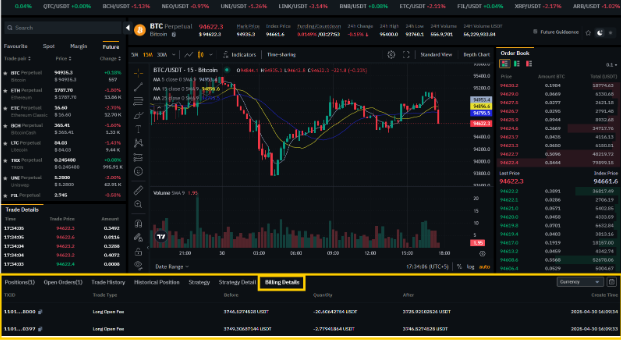
Future Trading on BNQ Global is an opportunity for users to open positions with leverage. For each Future Trade and Positions that is completed, the billing details are available on the Future Trade interface for users to check and to make further informed decisions. You can check your billing details on the BNQ Global exchange by following these steps:

  1. Login to your BNQ Global account on www.bnqglobal.com.

  2. Once logged in, scroll to the Futures option in the header.

  3. Here in the menu click on USDT-M Perpetual Futures to open the Future Trade interface.

  4. Once inside, scroll down to the place with all the Future Trade details.

  5. Here click on Billing Details to check the billing for each transaction made.

  6. You can scroll through the section to check your trade and billing history.
3.png

You can also check your Billing Details on the BNQ Global app for your Future Trades. And there you have it, simple steps to check your Future Billing Details. You can also check your billing details via the BNQ Global app.

Happy Trading!

Related Articles

  • How To check My Open Orders?
  • How To Open Long Trigger Positions?
  • How To Open Long Market Positions?
  • How To Apply Strategy Bots To Future Trades?
  • How To Transfer Funds Out Form Future Wallet?
  • How To Open Short Trigger Positions?
  • How To Open Short Limit Positions?
  • How To Transfer Funds Into Future Wallet?
  • How To Check My Billing Details?
  • How To check My Open Positions?