


How To Transfer Funds Into Future Wallet?
分析师发哥i
Updated at: 9 months ago
How To Transfer Funds Into Future Wallet?
BNQ Global Future Trading is one of the best options available for traders that are looking to trade with leverage. But before you start trading Future on BNQ Global, you need to have funds in your Future Wallet. If you are looking to transfer your funds into your Future Wallet on BNQ Global then follow this step by step guide to get started.
Transferring funds into your Future Wallet is very simple by following these steps.
For BNQ Global Website Users
For users that are using the BNQ Global website, follow these steps:
First log into your BNQ Global account on the website www.bnqglobal.com.
Once logged in, you’ll be redirected automatically to the Account Dashboard.
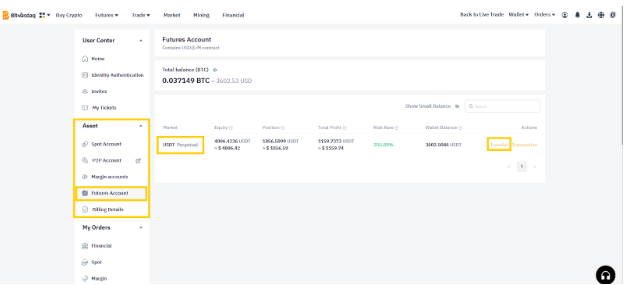
On the Dashboard page, under the Asset section, click on the Future Account.
This will redirect you to your BNQ Global Future Wallet.
Within the wallet USDT is listed, as it is the only coin you can transfer as of now.
Next to USDT click on the Transfer button.
A transfer prompt will open, choose the transfer wallet and your destination wallet.
Choose Future Account as your destination wallet, choosing in the “To” option.
Select any wallet from which you want to transfer funds “From”, example Spot Account.
Now enter the amount of USDT you want to transfer.
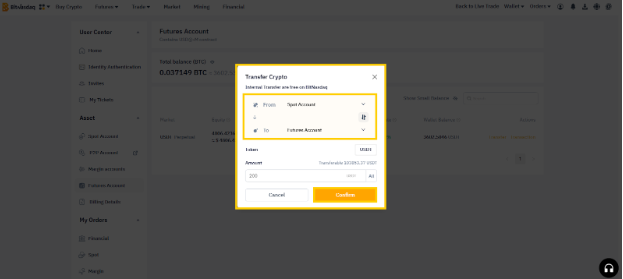
Once you have added all the information, click on the Confirm button.
And there you have it, your transfer completed.
For BNQ Global App Users
For users that are using the BNQ Global App, follow these steps:
First log into your BNQ Global account on the BNQ Global App.
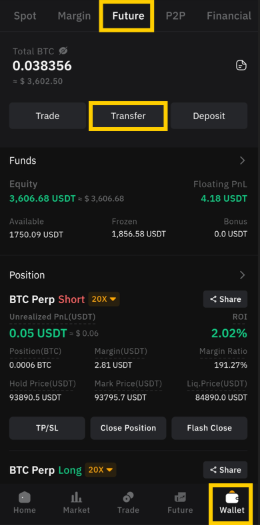
Now open the BNQ Global App, and tap on the Waller tab.
Within the Wallet tab, tap on the Future option to open Future Wallet.
In the Future Wallet, tap on the Transfer button.
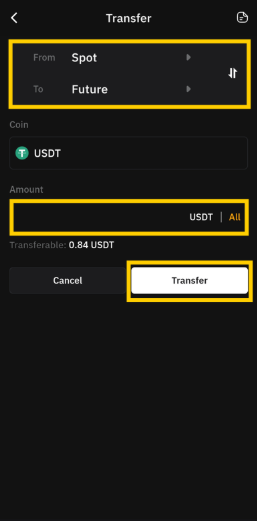
Choose Future as your destination wallet, choosing in the “To” option.
Select any wallet from which you want to transfer funds “From”, example Spot.
You can enter the amount of USDT you wish to transfer here.
Once you have added all the information, tap on the Transfer button.
And there you have it, your transfer completed.
By following these very simple steps, users have the option to transfer any coin of their choice to any of their own wallets within BNQ Global.